 BULLSTAR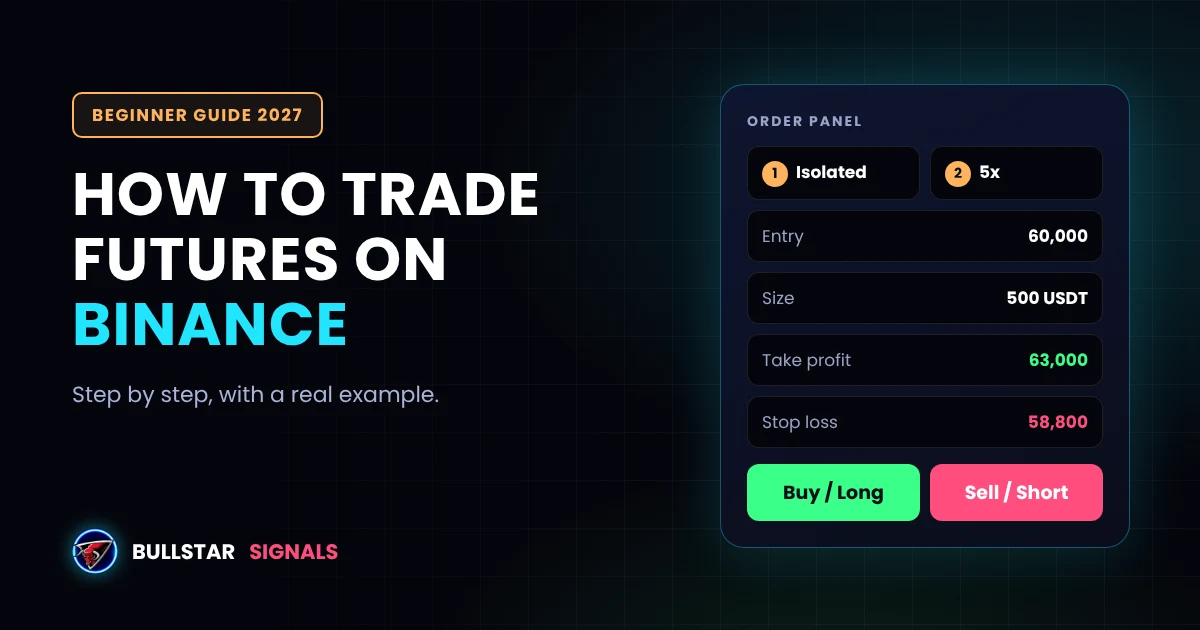
Binance is the largest crypto futures exchange in the world, but its futures screen can look scary the first time you open it. Leverage, margin, liquidation price, funding rate... it's a lot of new words at once.
This guide explains how to trade futures on Binance step by step, in plain English. You'll learn how to open your futures account, move funds, choose the right settings, size your position, add a stop loss, and close your trade. We'll use a real example with numbers all the way through, so you can see exactly how each step works.
Futures trading with leverage is high risk, and many beginners lose money. Never trade with money you can't afford to lose. Binance Futures is also not available in every country, including the United States, so check what Binance allows where you live before you start.
What Are Binance Futures?
When you buy Bitcoin on the spot market, you own the coin. With futures, you don't own anything. You trade a contract that follows the price of the coin, and you profit or lose based on how the price moves.
That gives you two big differences from spot trading:
- You can profit when prices fall by opening a short position.
- You can use leverage to open a bigger position than your balance, which multiplies both profits and losses.
Most futures trading on Binance happens on USDⓈ-M perpetual contracts, like BTCUSDT Perpetual. "USDⓈ-M" means your margin and profit are in USDT or another stablecoin, and "perpetual" means the contract never expires. If you're not sure whether futures are right for you, read our comparison of spot vs futures trading first.
You expect the price to rise. You buy at 60,000, the price goes to 63,000, and you close with a profit.
You expect the price to fall. You sell at 3,000, the price drops to 2,850, and you close with a profit.
Key Binance Futures Terms in Plain English
You'll see these words on the futures screen. Here's what they mean:
| Term | What it means in plain words |
|---|---|
| Futures contract | An agreement to trade a coin at a price, without owning the coin. You only trade the price movement. |
| Perpetual | A futures contract with no expiry date. Most Binance futures trading happens on perpetuals like BTCUSDT Perpetual. |
| Long | You profit if the price goes up. |
| Short | You profit if the price goes down. |
| Leverage | Lets you open a bigger position than your margin. 5x means $100 controls a $500 position. |
| Margin | The money you put up to open and keep a position. |
| Isolated / Cross | Isolated risks only the margin of that one position. Cross can use your whole futures balance to keep positions open. |
| Liquidation price | The price where your position is closed automatically because your margin is almost gone. |
| Mark price | A fair price Binance uses for liquidations and PnL, so one sudden spike doesn't liquidate you. |
| Funding rate | A small payment between longs and shorts on perpetual contracts, usually every 8 hours. |
| PnL / ROE | PnL is your profit or loss in USDT. ROE is that profit or loss as a percentage of your margin. |
1Create and verify your Binance account
If you don't have a Binance account yet, sign up on the official Binance website or app. Always type the address yourself or use the official app store listing, because fake Binance login pages are common.
Next, complete identity verification (KYC). Binance asks for your personal details, a photo of your ID and a quick face scan. You need a verified account to trade futures. While you're there, turn on two-factor authentication (2FA) to protect your account.
2Open your Binance Futures account
Your futures account is separate from your normal Binance wallet. To open it:
- On the website, open the Derivatives menu and choose USDⓈ-M Futures. In the app, tap Futures at the bottom of the screen.
- Click Open Now (or "Open Futures Account").
- Binance may ask you to answer a short quiz about futures trading. It checks that you understand leverage and liquidation. Take your time, it's worth knowing the answers.
Once it's done, your USDⓈ-M Futures wallet is ready.
3Transfer USDT to your Futures wallet
You can't trade futures with funds in your Spot wallet. You need to move them first:
- Buy or deposit USDT into your Binance Spot wallet.
- On the futures screen, click Transfer.
- Choose From: Spot and To: USDⓈ-M Futures, select USDT, and enter the amount.
- Confirm. Transfers between your own Binance wallets are instant and free.
Tip: only transfer what you plan to trade with. Keeping the rest in Spot adds a layer of safety.
4Choose a futures contract
At the top left of the futures screen, click the pair name and search for the coin you want, for example BTCUSDT Perpetual. Make sure you're in USDⓈ-M, not COIN-M. COIN-M contracts use the coin itself as margin, which is more complicated for beginners.
When you're starting out, stick with big, liquid coins like BTC and ETH. Smaller coins move much faster and can hit your stop loss or liquidation price in seconds. The time of day matters too. Our guide on the best time to trade crypto explains when volume and volatility are highest.
5Set margin mode and leverage
Above the order panel you'll see two buttons, usually showing something like Cross and 20x. Change both before your first trade.
- Margin mode: choose Isolated. With Isolated, the most you can lose on a trade is the margin you put into that trade. With Cross, a losing trade can use your whole futures balance.
- Leverage: choose 2x to 5x. Binance often sets a high leverage by default. Lower leverage keeps your liquidation price far away. At 5x, the price has to move about 20% against you before liquidation. At 50x, it's only about 2%.
Leverage doesn't decide how much you win or lose. Your position size and stop loss do that. Leverage only decides how much margin you need and how close liquidation is. Our leverage guide and liquidation guide explain this in detail.
- Margin mode: choose Isolated as a beginner.
- Leverage: keep it low, 2x to 5x.
- Order type: Limit for a set price, Market to enter now.
- Price: your entry price (Limit orders only).
- Size: how big the position is. Work it out from your risk, not from your leverage.
- TP/SL: tick the box and add your take profit and stop loss before you open the trade.
- Buy/Long or Sell/Short: long if you expect the price to rise, short if you expect it to fall.
Simplified illustration. Button names and layout on Binance can change slightly between the website and app versions.
6Choose your order type
Binance offers several order types. These are the ones you'll actually use:
| Order type | What it does | When to use it |
|---|---|---|
| Limit | Opens at your chosen price or better. | When you want a specific entry, like the entry zone of a signal. Lower maker fee. |
| Market | Opens immediately at the best available price. | When you need to enter or exit right now. Higher taker fee and possible slippage. |
| Stop Limit | Places a limit order once a trigger price is reached. | To enter on a breakout at a controlled price. |
| Stop Market | Places a market order once a trigger price is reached. | Most often used as a stop loss, because it fills even in fast moves. |
| Trailing Stop | A stop that follows the price as it moves in your favor. | To protect profit in a strong trend. |
For most trades, a Limit order for the entry and a Stop Market order for the stop loss is a solid, simple setup.
7Calculate your position size
This is the step most beginners skip, and it's the most important one. Don't ask "how much leverage should I use?" Ask "how much am I willing to lose if this trade goes wrong?"
A common rule is to risk 1% to 2% of your account per trade. Then the position size is:
Position size = Amount you risk ÷ Stop loss distance (%)
Here's a full example:
| Example trade (example prices) | Value |
|---|---|
| Account balance | $1,000 |
| Risk per trade (1%) | $10 |
| Direction | Long BTCUSDT Perpetual |
| Entry | 60,000 |
| Stop loss | 58,800 (2% below entry) |
| Position size | $10 ÷ 2% = $500 |
| Leverage | 5x |
| Margin needed | $500 ÷ 5 = $100 |
| Rough liquidation price | about 48,000, far beyond the stop loss |
| Take profit | 63,000 (5% above entry) |
| Result if TP is hit | about +$25 before fees |
| Result if SL is hit | about -$10 before fees |
Notice that leverage didn't change the risk at all. If the stop loss is hit, you lose about $10 at 2x, 5x or 10x. Leverage only changed how much margin was locked up. You can calculate this for any trade with our free position size calculator.
8Add a stop loss and take profit, then open the trade
Now enter the trade in the order panel:
- Select Limit and enter your entry price, in our example 60,000.
- Enter the size. You can switch the size unit to USDT so you can type 500.
- Tick TP/SL. Enter your take profit (63,000) and stop loss (58,800). You can choose whether they trigger on the Mark or Last price. Mark price is less affected by sudden spikes.
- Click Buy/Long if you expect the price to rise, or Sell/Short if you expect it to fall.
- Check the confirmation window, especially the leverage and size, then confirm.
Your order appears under Open Orders until the price reaches your entry. Once it fills, it moves to Positions.
Add the stop loss at the same moment you open the trade. If you plan to "add it later", a fast move can liquidate you first. A stop loss turns an unknown loss into a small, planned one.
9Manage and close your position
In the Positions tab at the bottom of the screen, you'll see your entry price, mark price, liquidation price, margin and your PnL and ROE in real time.
- To close the whole position, click Market to close now, or set a Limit close price.
- To take partial profits, close part of the position at your first target and let the rest run. Many traders then move the stop loss to the entry price, so the rest of the trade can't turn into a loss.
- To edit TP/SL, use the TP/SL option next to the position.
If your take profit or stop loss is hit, Binance closes the position automatically. Your result then appears in your futures wallet balance.
Binance Futures Fees and Funding Rate
Every futures trade has two types of cost. For regular users on USDⓈ-M futures, Binance lists these trading fees:
| Cost | Typical rate | On a $500 position |
|---|---|---|
| Maker fee (Limit orders) | 0.02% | $0.10 |
| Taker fee (Market orders) | 0.05% | $0.25 |
| Funding (per interval, often around) | 0.01% | about $0.05, paid or received |
Fees are charged on the full position size, not your margin. In our example, opening and closing the $500 position with Market orders costs about $0.50 in total. Paying fees in BNB gives a 10% discount, and fee levels can change, so check Binance's official fee page.
Funding rate: perpetual contracts use funding to keep the contract price close to the real coin price. Every funding interval, which is usually every 8 hours, one side pays the other. When the rate is positive, longs pay shorts. When it's negative, shorts pay longs. You only pay or receive funding if you hold a position at the funding time. The countdown is shown at the top of the futures screen.
Free Binance Futures Profit Calculator
Try different numbers to see how leverage, fees and your exit price change the result. Notice how the same price move gives a much bigger ROE at higher leverage, and the same is true for losses.
7 Mistakes Beginners Make on Binance Futures
- Using the default leverage. Binance often sets a high leverage by default. Always change it before your first trade. High leverage puts your liquidation price very close to your entry.
- Trading without a stop loss. One bad move can wipe out weeks of profit. Add the stop loss when you open the trade, not later. Read the stop loss secret to see why this matters.
- Sizing by leverage instead of risk. "I have $100, so I'll use 20x" is how accounts disappear. Decide how much you can lose first, then work out the size.
- Using Cross margin on every trade. In Cross mode one losing position can use your whole futures balance. Start with Isolated.
- Moving the stop loss further away. If the price is near your stop, the plan was wrong. Accept the small loss instead of turning it into a big one.
- Revenge trading after a loss. Opening a bigger trade to "win it back" is the fastest way to lose more. Take a break after a loss.
- Ignoring fees and funding. Many small Market orders and positions held for days add up. Use Limit orders when you can.
For a simple set of rules to avoid these, see our 5 risk management rules.
How to Follow Crypto Signals on Binance Futures
A trading signal tells you what to trade and where. Here's how each part of a signal goes into the Binance order panel:
| In the signal | Where it goes on Binance Futures |
|---|---|
| Pair, e.g. #SOL/USDT | Search SOLUSDT Perpetual in USDⓈ-M Futures |
| Direction: Long or Short | Buy/Long or Sell/Short button |
| Leverage, e.g. 5x | Leverage button above the order panel (or lower) |
| Entry zone | One or more Limit orders inside the zone |
| Targets (TP1, TP2, TP3) | Take profit, or several Limit close orders for partial profits |
| Stop loss | Stop loss in the TP/SL box, ideally a Stop Market order |
Our guide to reading a signal explains each part in more detail. If you don't want to enter every trade by hand, you can connect Binance to Cornix and let signals open and close automatically on your account. Our Cornix setup guide shows how, including the safe API settings to use.
Bullstar Signals posts futures signals on coins listed on Binance Futures, each with an entry zone, targets and a stop loss. Every closed VIP signal since 2022 is listed on our public results page, losses included. Join the free channel and follow the signals on paper before you trade with real money.
Join Bullstar Signals free channelFrequently Asked Questions
Can beginners trade futures on Binance?
Yes, but only after learning the basics. Start with a small amount, Isolated margin, low leverage like 2x to 5x, and a stop loss on every trade. Many beginners lose money on futures because they use high leverage without a plan.
How much money do I need to start futures trading on Binance?
You can start with a small amount, and minimum order sizes depend on the contract. A more useful question is how much you can afford to lose. Many traders start with an amount where a 1% risk per trade is only a few dollars.
What is the best leverage for beginners on Binance Futures?
Between 2x and 5x. Your profit or loss is decided by your position size and stop loss, not by leverage. Lower leverage simply keeps your liquidation price far away from your entry.
Can you lose more than you invest on Binance Futures?
With Isolated margin, the most you can lose on a position is the margin you put into it. With Cross margin, a losing position can use your whole futures wallet balance. That is why Isolated is safer for beginners.
What is the difference between USDⓈ-M and COIN-M futures?
USDⓈ-M futures use stablecoins like USDT as margin, and your profit and loss is in USDT. COIN-M futures use the coin itself, such as BTC, as margin. Most traders, and most signals, use USDⓈ-M.
What are the fees for Binance Futures?
For regular users on USDⓈ-M futures, Binance lists a 0.02% maker fee and a 0.05% taker fee, with a 10% discount if you pay fees in BNB. Perpetual contracts also have a funding rate, usually exchanged every 8 hours. Fees can change, so check Binance's fee page.
Is Binance Futures available in my country?
Not everywhere. Binance Futures is not available in some countries, including the United States, and other countries limit crypto derivatives for retail traders. Check what Binance allows for your country before you start.
Can I trade Binance Futures on the mobile app?
Yes. In the Binance app, tap Futures at the bottom of the screen. The steps are the same as on the website: choose the contract, set margin mode and leverage, add your TP/SL, then open the trade.
Final Thoughts
Trading futures on Binance isn't complicated once you know the steps: open the futures account, transfer USDT, pick a liquid pair, choose Isolated margin and low leverage, size the trade by risk, add your stop loss and take profit, then manage the position.
The part that takes longer to learn is discipline. Keep risk small, never skip the stop loss, and don't let leverage make decisions for you. Practice with small amounts until the process feels routine. That's how you stay in the game long enough to get good at it.
Disclaimer: This guide is for education only and is not financial advice. Binance features, fees and availability can change and differ by country. Prices in the examples are for illustration only. Crypto futures trading with leverage carries a high risk of loss.